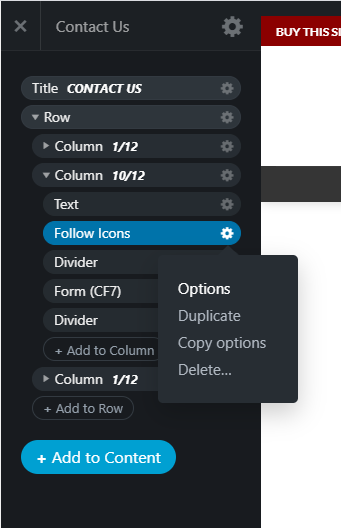
If your site is running the Flatsome theme. You can change your social media links using the following guide.
Topbar / Header links

The topbar / header links can be changed by:
- Logging into your WordPress admin panel
- Flatsome > Theme Options > Header > Follow Icons
Footer Block links

The footer links can be changed by:
- Logging into your WordPress admin panel
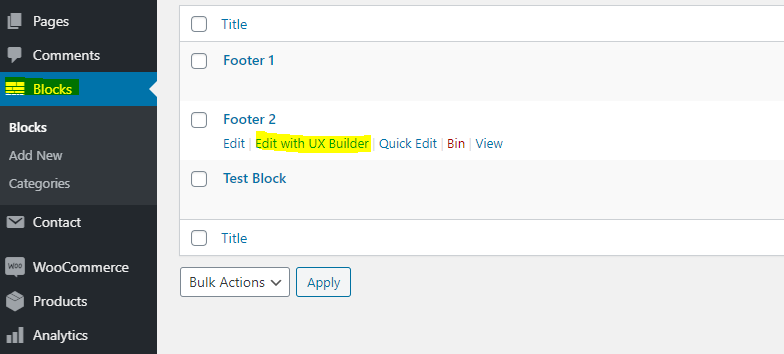
- Blocks > Footer 2 > Edit with UX builder
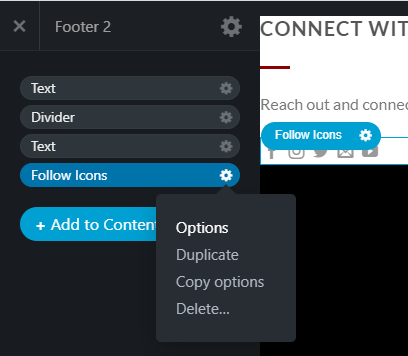
- In the UX builder, right click the ‘Follow Icons’ then options on the left menu
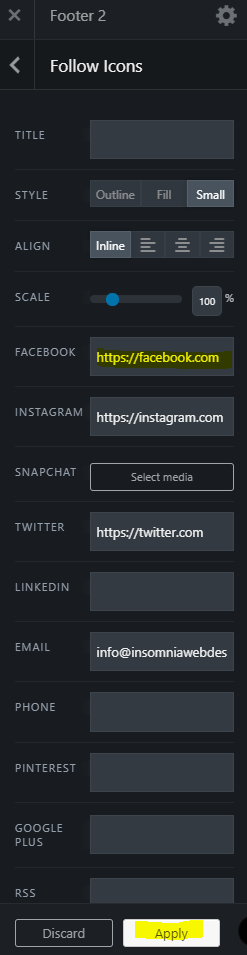
- Enter your social media properties
- Apply
- Update
Contact Us Page Links
The contact us page social media links can be changed by:
- Logging into your WordPress admin panel
- Pages > All Pages > Contact Us > Edit with UX builder
- In the UX builder, right click the ‘Follow Icons’ then options on the left menu
- Enter your social media properties
- Apply
- Update